
Solution guide
More information for your application
Open a section for the information you need. Product pages show the selected configuration and current purchasing details.
Equipment selection and alternatives
Choose local or connected recording
Use a data logger to capture measurements over time. Choose a standalone USB logger for local retrieval, multi-channel acquisition for several signals, or a paperless recorder for an installed local display and history. Remote access and notifications require a supported network and platform path; recording alone does not provide live alarms.
Match every input
List thermocouple types, RTD wiring, 4–20 mA, voltage, pulse/frequency and digital protocols separately. Confirm supported input types and simultaneous channel count, isolation, sensor excitation, input impedance, range and sampling rate for the exact model. An analogue input does not automatically accept a pulse signal or provide totalisation.
Plan records and display
Specify normal and peak sampling rates, logging interval, recording duration, storage capacity and behaviour when memory fills. Confirm timestamps, time synchronisation, units, scaling, event markers, export format and retrieval software. Check whether a local LCD, chart view or alarm output is actually included in the selected version.
Equipment options for this application
Reusable temperature logger: ZLOG-T with USB PDF/CSV reporting. View options and current price.
System design and connections
System overview
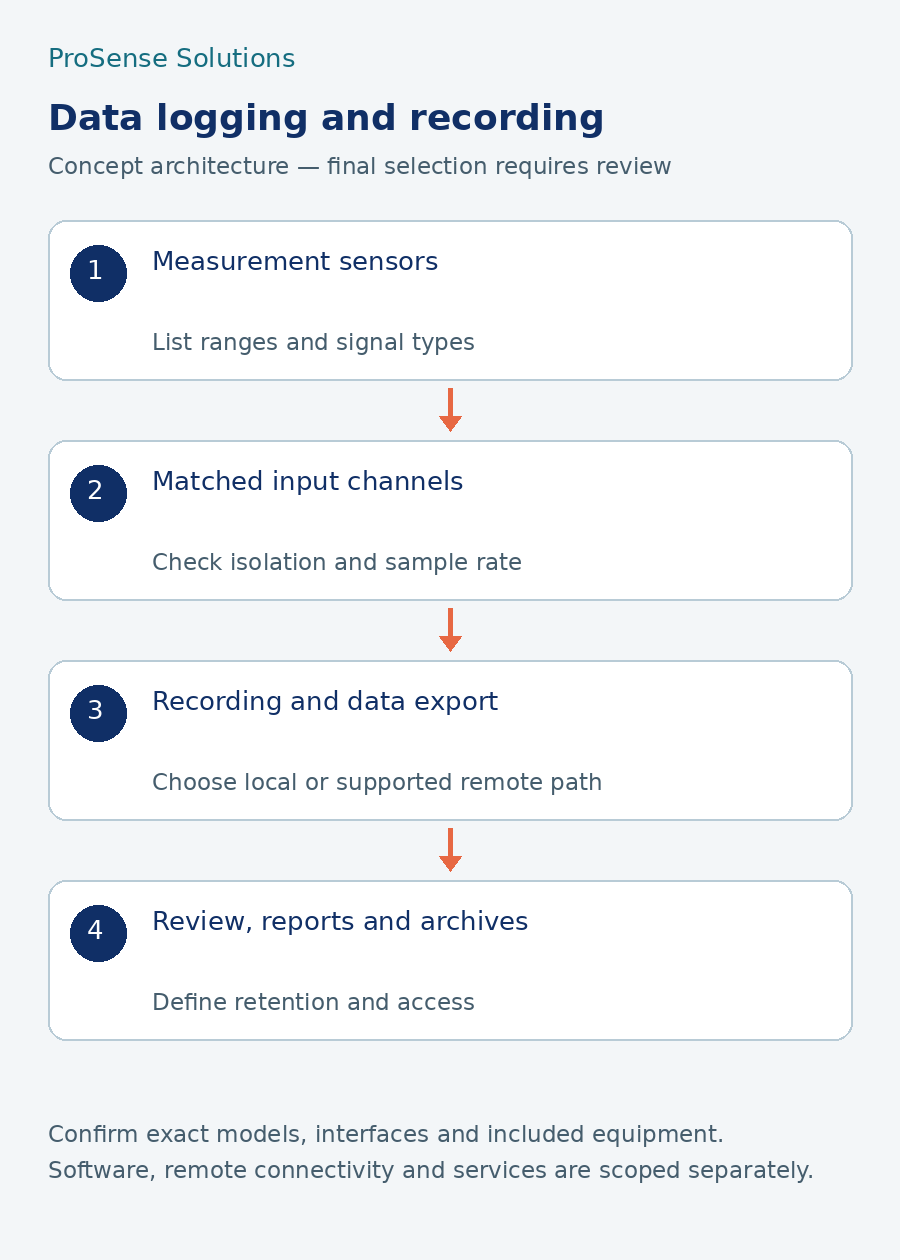
Compare USB loggers, multi-channel acquisition and paperless recorders by signal and recording needs.
Example system architecture
Sensor or transmitter → matching logger/recorder input → local storage and display → USB or supported network export → review/reporting. Optional remote monitoring adds a verified gateway or software integration, network service, account and licence.
Quotation, installation and support
Equipment schedule and options
Request exact logger/recorder model, populated input modules, probes, signal converters where needed, supply, enclosure, mounting, cables, retrieval software and requested calibration documents. List spare channels, accessories, software charges and configuration separately. Confirm kit inclusions against its current listing.
Prepare your enquiry
Send signals and ranges, channel count, sampling and retention requirements, operating environment, power, desired display, export format, remote-access needs, site location, quantity and required date. Include existing sensor models and wiring information.
Browse equipment and prepare a quotation
Use the product selector to choose the equipment family and features. Matching products appear below the controls. Confirm the exact model, options, published price and availability on the product page.
Open the product selection tool
Technical documents and manuals
Discuss your application / request a quote
Include your company, site/postcode, application, number of assets, measurements and ranges, existing equipment, power and communications, budget range, required date and supporting drawings. The quotation should identify equipment, quantities, accessories, documentation, any configuration, installation responsibilities, software term and recurring charges.
Equipment supply and project work have separate scopes. Installation and commissioning are not included in equipment supply. Any requested configuration, integration or software work must be confirmed in writing. Verify model-specific claims and required documentation before ordering.