.png)
Exploring the Capabilities and Specifications of the CX-FIBER-A/CX-FIBER-B Fiber to CAN RS485 RS232 Modules
Long-distance communication in industrial and automation environments demands reliable, flexible, and efficient solutions. The CX-FIBER-A and CX-FIBER-B modules address these needs by converting fiber optic signals into CAN, RS485, and RS232 interfaces. These modules enable seamless data transmission over extended distances while supporting multiple communication protocols, making them valuable tools for engineers and technicians working with complex control systems.
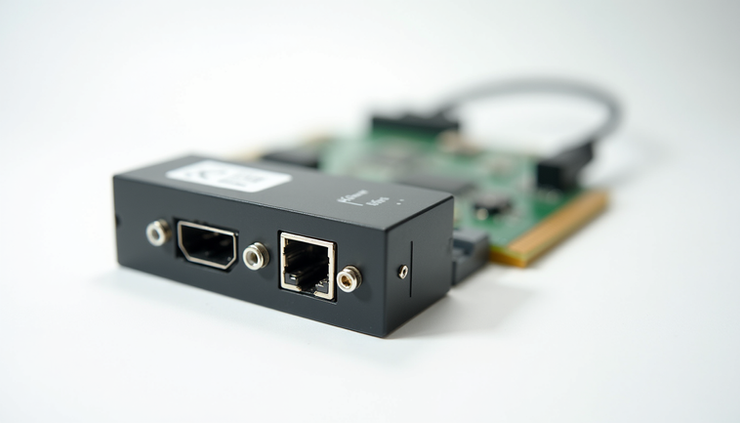
Overview of the CX-FIBER-A and CX-FIBER-B Modules for Long-Distance Communication
The CX-FIBER-A and CX-FIBER-B modules serve as fiber optic converters that extend the reach of CAN bus, RS485, and RS232 communication lines. Fiber optic cables offer significant advantages over traditional copper wiring, including immunity to electromagnetic interference, higher bandwidth, and the ability to cover distances up to several kilometers without signal degradation.
These modules convert fiber optic signals into electrical signals compatible with CAN, RS485, and RS232 interfaces. This capability allows users to maintain reliable communication in harsh industrial environments where electrical noise or long cable runs would otherwise cause data loss or errors.
The CX-FIBER-A and CX-FIBER-B are designed to support critical industrial communication protocols, making them suitable for applications such as factory automation, process control, and remote monitoring systems.
Integrated Features: 2 CAN Buses, RS485, and RS232 Interfaces
One of the standout features of these modules is the integration of multiple communication interfaces:
Two CAN buses: The modules provide dual CAN bus ports, allowing simultaneous communication on two separate CAN networks. This is useful for systems that require redundancy or need to connect to multiple CAN segments.
RS485 interface: RS485 is a popular standard for multi-point serial communication, often used in industrial networks due to its noise immunity and ability to support long cable lengths.
RS232 interface: RS232 remains widely used for point-to-point serial communication, especially for connecting legacy devices or simple serial peripherals.
The combination of these interfaces in a single module offers flexibility for various system architectures. Users can connect devices using CAN, RS485, or RS232 protocols depending on their specific requirements.
Limitations of Using RS485 and RS232 Simultaneously
While the modules support RS485 and RS232 interfaces, it is important to understand their operational constraints. The CX-FIBER-A and CX-FIBER-B cannot use RS485 and RS232 communication at the same time. This limitation arises because both interfaces share certain internal resources and signal lines within the module.
Users must select either RS485 or RS232 mode based on the connected device and communication needs. Switching between these modes typically requires configuration changes, either through hardware jumpers or software settings.
This design choice simplifies the module’s circuitry and reduces cost but requires careful planning during system integration to avoid communication conflicts.
Installation Dimensions and Mounting Options
The CX-FIBER-A and CX-FIBER-B modules are designed for easy installation in industrial environments. Their compact dimensions allow them to fit into control cabinets or enclosures without occupying excessive space.
Dimensions: The modules have a slim profile, typically around 100 mm in length, 70 mm in width, and 30 mm in height. These measurements make them suitable for dense panel layouts.
Mounting options: Both modules support DIN-rail mounting, which is a standard method for securing industrial devices inside control panels. This option facilitates quick installation and removal without tools.
Wall hanging: For applications where DIN-rail mounting is not feasible, the modules also include provisions for wall mounting. This flexibility allows users to install the modules in various locations depending on the system design.
The availability of multiple mounting options ensures that the modules can be integrated into existing setups with minimal modification.
Technical Specifications
Understanding the technical specifications of the CX-FIBER-A and CX-FIBER-B modules helps users select the right device for their application. Key specifications include:
Maximum fiber length: The modules support fiber optic communication over distances up to 20 kilometers (12.4 miles). This range is ideal for connecting remote equipment or spanning large industrial sites.
Baud rate: The modules support baud rates up to 1 Mbps for CAN communication, which is standard for many industrial CAN networks. RS485 and RS232 baud rates can vary depending on configuration but typically support speeds up to 115.2 kbps.
Optical ports: Each module includes two optical ports for fiber connections, supporting single-mode or multi-mode fiber cables depending on the model. These ports use standard SC connectors for easy integration.
Environmental conditions: The modules are built to operate reliably in industrial environments. They typically support operating temperatures from -40°C to +85°C (-40°F to +185°F) and have protection against dust and moisture, often rated at IP20 or higher.
These specifications ensure that the CX-FIBER-A and CX-FIBER-B modules can handle demanding communication tasks in challenging conditions.
Importance of the User Manual for Proper Use and Configuration
The user manual is an essential resource for anyone working with the CX-FIBER-A and CX-FIBER-B modules. It provides detailed instructions on installation, wiring, configuration, and troubleshooting.
Key topics covered in the manual include:
Step-by-step guidance on mounting and connecting the modules
Configuration settings for selecting CAN, RS485, or RS232 modes
Wiring diagrams for fiber optic and serial interfaces
Safety precautions and environmental requirements
Troubleshooting tips for common issues
Following the user manual ensures that the modules operate correctly and safely, preventing damage to equipment and minimizing downtime.


